
Script Manager-SManager(NoAds)
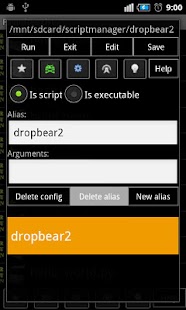
(Cron jobs)Mostra finestre di dialogo grafiche da processi in esecuzione.Creare widget al desktop.Modificare e creare script, anche crearli da url.Inserire il codice negli script utilizzando i codici QR.Condividi uscita esecuzione.Bookmark script.Prova SM_VERSION e / o SM_VERSIONCODE di sapere se è in esecuzione all'interno SManager.
Con i privilegi di root si può anche eseguire come superutente.
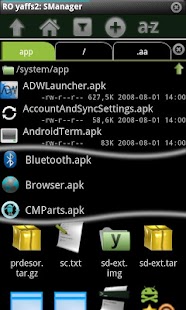
* File manager Sfoglia tutti i file di telefono e file di rete.zip, tgz, tar, tbz e yaffs2 (nandroid backup) di sostegno.Cerca di rete (compreso http://) file zip senza download completo.Aprire più directory in schede diverse.
(3 schede per la versione annunci)File di supporto di collegamento (Il filesystem supportati)Multiselect da supporto differente directory.
(Versione Annunci supportano solo 7 selezioni da diverse directory.
Nessun limite se selezioni sono nella stessa directory)
* Root Explorer (Radicati dispositivo necessario)Automaticamente montare le partizioni in RO RW quando necessario.Editor di Root (Consenti modificare i file con i privilegi di root.
Configurare "Sfoglia come root")Aprire e modificare tutti i file indipendentemente le autorizzazioni che hanno con l'applicazione selezionata.
Utilizzare ATTENTAMENTE (Configura "Sfoglia come root" al fine di ottenere questa funzione)
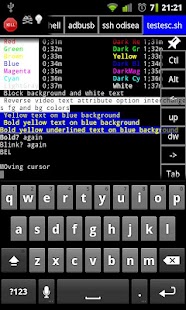
* Console schermoVolume Up: mappata a Esc.Volume: Mappato il tasto Invio.DPad stampa: mappato il tasto di controllo.
(Premere e poi premere un altro tasto.
Non pressione contemporanea richiesto)
Abilita "gesti extra" in schermata di configurazione, al fine di mandare a casa / Fine, Del / scheda, tasti sinistra / destra, avanti / pagina giù.
Questo è molto utile per eseguire la shell e connessioni ssh.Strani caratteri: se si ottiene un sacco di [[^ caratteri, è dovuto hai "gesti supplementari" abilitato e script / programma non di elaborarli.
Utilizzare lato più a destra dello schermo per inviare eventi standard di scorrimento, o disabilitare "gesti extra"
* SM MultiselectConsente di selezionare automaticamente i file selezionati in applicazioni di terze parti, come la Galleria, all'interno del browser SM
* Di memorizzazione esterna Note SDÈ possibile installare sulla scheda SD SManager memorie esterne, ma si deve essere sapere:- Se si utilizzano script di avvio o script programmato, è necessario app SMExternalSD.- Tutti gli eventi quali il cambiamento stato della rete e gli script di linea mentre lo storage esterno è condiviso o smontato non verranno elaborati.
Anche se avete installato SMExternalSD
NOTA:SManager non si avvia fino a quando le esecuzioni di memorizzazione esterno è montato.
NOTA 2:Riconosciuto alcuni programmi / demoni (come dropbear) non riesce se è stdin chiuso.
Prova a mettere "exec 0> & 1" di riaprire stdin in esecuzioni sfondo.
* Non ci sono annunci versione caratteristicheNessun annuncio.Eseguire script da widgets senza aprire console.Nessun limite di selezione multipla.Nessun limite di apertura più directory.Alias chiavi in SMConsole.Nascondi / mostra SMConsole / SMBrowser bar con gesto su / giù nella parte superiore dello schermo.
About Script Manager-SManager(NoAds)
- Package name (App ID)
- os.tools.scriptmanagerpro
- Available on
- Google Play
- Price
- $3.10
- Developer
- devwom
Looking for the Script Manager-SManager(NoAds) APK?
The safest way to get Script Manager-SManager(NoAds) (os.tools.scriptmanagerpro) on your Android device is to install it directly from Google Play — you'll always get the latest official version, automatic updates, and no risk of modified or infected APK files from third-party sites.

Gaming Features
Enjoy immersive gaming experience with various game modes.
Weather Features
Get accurate weather forecasts and real-time updates.
Smart Home
Control and monitor your home with smart features.
Guarda Script Manager-SManager(NoAds) in azione
Cosa dicono i nostri utenti
Non fidarti solo della nostra parola. Ecco cosa dicono i nostri utenti di questa app Android.
"Oct 2021 : Getting a little long in the tooth😅 Still works (for the most part) since 2013"
"Please add custom theme editor for file explorer and shell terminal please update please"
"Good"
"This is the only file manager for power users. Some things could be better and alot worse. keep updating please"
"Please update to work with newer versions of droid"
"good application but smaller widget is needed (currently I can have only 4 widgets on the screen with 1080 x 1920 resolution) + running script notification often stuck on notification panel (after killed in main app, must FS SMgr) @ oreo 8.1 (emui 8)"
"I started to use it bcoz of the scripts, now it has become my default file explorer and I have decided to go pro, mainly to support development! Not only it's much faster than the most popular file explorers out there, but it also includes console and script management tools. Besides, browsing and extracting compressed files it's faster too. I'll give five when it looks nicer and allows setting default apps. Keep it up devwom!"
"Purchased this years ago to support the developer. Glad to see the support from SELinux to Nougat. Thanks!"
"UPDATE: Now working again! No longer works with this version of Android."
"Please update to work for the latest OS I will change rating once it works again! - update dev fixed the issue! Thanks so much"
Frequently Asked Questions
Is Script Manager-SManager(NoAds) free?
Script Manager-SManager(NoAds) is a paid app — it costs $3.10 on Google Play. You pay once through your Google account and can install it on your Android devices.
How do I install Script Manager-SManager(NoAds) on Android?
Open Google Play on your Android phone or tablet, search for Script Manager-SManager(NoAds) by devwom or tap the Google Play button on this page, then tap Install. The app downloads and installs automatically.
What is os.tools.scriptmanagerpro?
os.tools.scriptmanagerpro is the App ID (package name) of Script Manager-SManager(NoAds) on Google Play. Every Android app has a unique package name, and it is the safest way to verify you are installing the official app.
Is Script Manager-SManager(NoAds) safe to download?
Installing Script Manager-SManager(NoAds) from Google Play is the safest option: you get the official version published by devwom, verified by Google Play Protect, with automatic updates. Avoid APK files from unofficial third-party sites.

Get Script Manager-SManager(NoAds) Today
Script Manager-SManager(NoAds) for Android — $3.10 on Google Play.
Compatible with Android phones and tablets — available on Google Play.
Chiedi all'IA su questa app
Ottieni risposte istantanee su funzionalita, suggerimenti e altro.